Pipeline components
The EHT-HOPS pipeline consists of five stages of iterative fringe-fitting and post-processing calibration stages. A detailed description of the capabilities of the pipeline can be found in Blackburn et al. (2019).
Stages in the pipeline
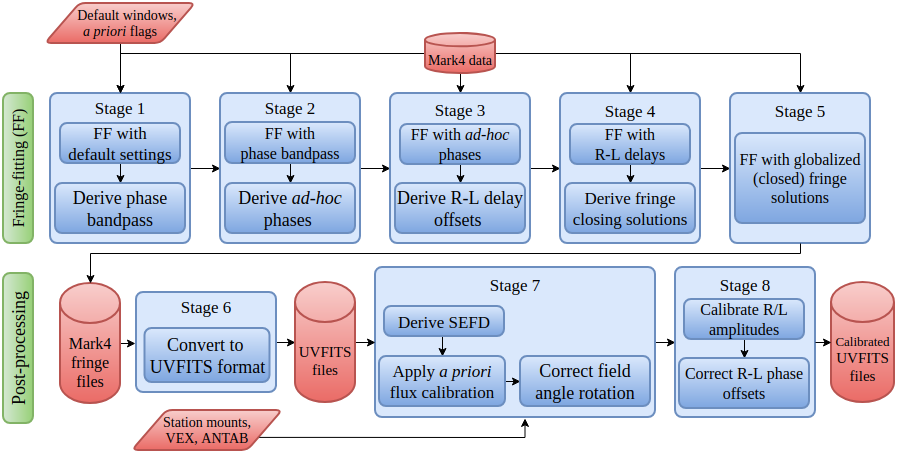
A typical EHT-HOPS pipeline workflow (Natarajan et al., in prep).
The HOPS fourfit program performs fringe-fitting. A control file consisting of “control commands” that specify data selection
and the calibration parameters is passed as input to fourfit. At each fringe-fitting stage, calibration scripts in the eat
library are used to generate more control commands and files which are then appended to the original set of commands and passed
on to fourfit in subsequent stages. Control commands added manually by the user after inspecting the data and the calibration
solutions may also be added to the control files.
Fringe-fitting is performed in stages 0 to 5, with each stage building on the solutions derived in the previous stage. All stages consist of the following common steps:
0.launch– sets up the environment variables and launches the pipeline.1.version– logs the versions of all python dependencies.2.link– links the archival data to the working directory.3.fourfit– performs fringe-fitting using the control files generated in the previous stage.4.alists– creates the summary alist files.5.check– generates summarymarimonotebooks with diagnostic plots using the output alist files and the fringe-fitting solutions.6.summary– collects all the errors and warnings from the previous steps in a single logfile.9.next– sets up the environment for the next stage (copying scripts and control files as necessary).
The stage-specific steps (usually step 7) perform additional operations and write out control files to be input to the following stages.
7.pcalin stage1.+flags+wins– derives phase bandpass solutions.7.adhocin stage2.+pcal– derives adhoc phase solutions.7.delaysin stage3.+adhoc– derives R-L delay solutions.7.closein stage4.+delays– globalizes fringe solutions.
Stage 5.+close performs one final round of fringe-fitting in which all the solutions obtained above are applied.
The post-processing stages are not part of the main pipeline workflow, and are run only as needed:
Stage
6.uvfitsgeneratesUVFITSfiles from the Mk4 fringe files. Starting from this stage, the uvfits files are used as inputs to the subsequent stages.Stage
7.aprioriderives SEFDs using metadata from antab/, vex/, and array.txt files) and performs amplitude calibration and field angle rotation correction.Stage
8.+polcalperforms R/L gain ratio calibration.
Todo
Automatic simultaneous multi-band data processing is not supported by the pipeline yet. Each band is processed independently.
Data organization
The inputs and outputs of the HOPS fourfit program conform to the
specifications of the Mark 4 (mk4) data format.
The command-line arguments to the pipeline described below are designed around minimal assumptions about how the input data are organized. These assumptions are necessary since, unlike a CASA Measurement Set, Mark4 data are distributed among thousands of data files in a custom directory structure. All input Mark 4 files are expected under this directory structure:
SRCDIR/
└── CORRDAT/
    └── <intermediate subdirectories (multiple levels)>/
        └── <expt_no>/
                └── <scan_no>/
                    └── <input mk4 files>
where
SRCDIRThe top-level source directory.
CORRDATA colon-separated prioritized list of data directories containing the data. Directories listed earlier take higher precedence.
<intermediate subdirectories (multiple levels)>Zero or more levels of subdirectories.
<expt_no>Directory names corresponding to the HOPS experiment number.
<scan_no>Directory names corresponding to the scan number. These directories contain all input
mk4files corresponding to a single scan.
Refer to the Launching the pipeline section for more information on how
the data organization determines the options passed to the 0.launch script at each stage.
Metadata organization
The metadata directory (by default, found under ehthops/meta) is organized by campaign and observing frequency and contains:
HOPS control files (
cf*) used for fringe fitting.vex/,antab/, andarray.txtfiles used only for post-processing calibration.
Note
The antab/ files are not released with the pipeline by default due to their large size. Users must ensure that the
antab/*.AN files are created from the official ANTAB files found under antab/processed directory in the metadata
package released by the EHTC.
The metadata directory (by default, found under ehthops/meta) must be organized as follows:
<campaign>/
└── <frequency-in-GHz>GHz/
    ├── cf/
    │   └── cf[0-9]_b[1234]_*      # Stage- and band-specific control files
    ├── antab/
    │   └── <track>_<band>_proc.AN
    ├── vex/
    │   └── <track>.vex
    └── array.txt
Refer to the Launching the pipeline section for more information on how to set METADIR
environment variable at each stage in the 0.launch script.